As an Amazon Associate, we earn from qualifying purchases. Some links on this site are affiliate links at no extra cost to you. Our recommendations are based on thorough research and editorial judgment.


Which Calendars Are Best For Writers And Professionals?

When it comes to calendars, we’ve got some great options for writers and professionals. Google Calendar stands out for its collaboration features and syncing capabilities, while Microsoft Outlook Calendar excels in task management. If you seek something more visual, Apple Calendar is user-friendly and integrates seamlessly across devices. For content planning, tools like CoSchedule or Canva can help streamline your projects. Stick around, and we’ll explore more tips and tools to enhance your scheduling efficiency!
Key Takeaways
- Google Calendar offers excellent collaboration features, ideal for writers who work with teams or clients remotely.
- Microsoft Outlook Calendar provides robust task management capabilities, suitable for professionals needing organization alongside scheduling.
- Apple Calendar boasts a user-friendly interface with seamless syncing across Apple devices, perfect for writers with Macs and iOS devices.
- Fantastical combines a clean design with integrated tasks and reminders, enhancing productivity for freelancers and content creators.
- Tools like Calendly and Doodle streamline meeting scheduling, making them valuable for professionals seeking efficiency in their workflow.
Essential Features to Consider for Calendar Apps

You may be interested



When you’re on the hunt for the perfect calendar app, it’s vital to know what features can really make or break your scheduling experience. We should prioritize a user-friendly interface, which makes navigation easy and reduces the time spent learning how to use it. You’ll want a system that allows quick event creation with customized views—daily, weekly, or monthly—to suit our user preferences. Event scheduling and management features like automated creation from natural language and notifications for appointments can save us plenty of time, too. Finally, let’s not forget about syncing across devices. This way, we can guarantee our calendars are always up-to-date, no matter where we are, making those feature comparisons a breeze!
Top Calendar Apps for Writers and Freelancers

Choosing the right calendar app for writers and freelancers can feel like searching for a needle in a haystack, especially with so many options out there. Google Calendar stands out for its collaboration features and ease of integration with Gmail, while Microsoft Outlook Calendar excels at task management, making it perfect for business environments. Apple Calendar has a user-friendly interface and syncs seamlessly across devices. Then there’s Fantastical, which offers a clean design and supports both tasks and reminders. For those juggling meetings, tools like Calendly and Doodle simplify scheduling efficiency. Ultimately, we should pick a calendar that not only suits our workflow but also enhances our productivity, making our lives just a little bit easier—and more organized!
Editorial Calendar Software for Content Professionals

Editorial calendar software can revolutionize how we plan and execute our content strategies, especially when we’re juggling multiple projects and deadlines. Tools like Canva not only help us schedule our posts but also create eye-catching visuals seamlessly. This enhances our content collaboration and keeps everything unified. Alternatively, CoSchedule allows us to manage multi-channel campaigns effortlessly, integrating with platforms like WordPress, saving us time with its automation features. For those attached to spreadsheets, Smartsheet enables complex planning while maintaining familiarity. Finally, Wrike uses AI to boost scheduling efficiency, helping us streamline our workflows. By leveraging these tools, we can work smarter, not harder, ensuring our content remains organized and efficient!
Recommended Products

The premier tool to develop ideas and organize thinking...brainstorming, webbing, diagramming, planning, critical thinking, concept mapping etc.
Advantages of Digital Calendars Over Traditional Methods

Digital calendars have become essential tools for both writers and professionals, offering a range of advantages that make managing our time a breeze. One major perk is the synchronization benefits—updating our calendar on one device instantly reflects those changes on all our devices. This means no more losing track of our plans when we switch between devices!
Additionally, digital calendars allow for reminder customization. We can set alerts tailored to our unique schedules, ensuring we never miss an important deadline. Need a reminder a week in advance? No problem! While it’s true that the visual layout isn’t as intuitive as paper, digital calendars’ convenience with real-time editing and sharing really enhances our productivity. Embrace these tools, and watch our efficiency soar!
Recommended Products

✅【10.1" HD Portable Display】 Features a 10.1-inch full HD IPS screen with 178° wide viewing angle and auto-brightness adjustment, delivering clear visibility both indoors and outdoors. Ultra-slim design with plug-and-play operation, providing 24/7 continuous display without overheatings Instantly from Anywhere Digital Calendar 10.1
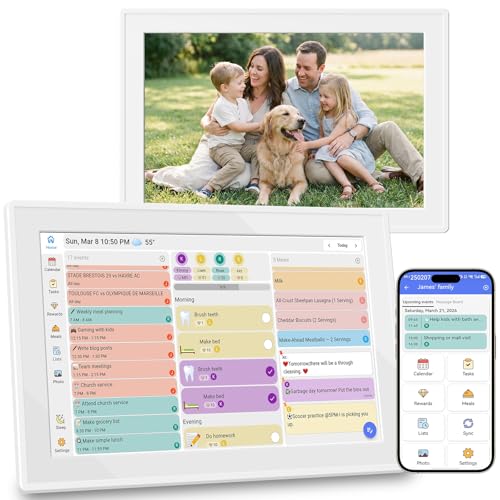
【Your Family Hub with No Subscription】 This digital calendar syncs Google Calendar, iCloud, and Outlook in real time. As a smart organizer, every schedule, chore list, weekly meal plan, grocery list, and digital picture frame feature comes fully unlocked with zero hidden fees and no subscription!

Dragon Touch Digital Picture Frame WiFi 10 inch IPS Touch Screen Digital Photo Frame Display, 32GB Storage, Auto-Rotate, Share Photos via App, Email, Cloud, Classic 10
Pricing and Accessibility of Calendar Tools

When we look at the pricing and accessibility of calendar tools, it’s essential to evaluate what fits our needs and budgets best. For example, Google Calendar is free and ideal for those already using Google Workspace. In contrast, Calendly AI Pro starts at $8 per user per month, tailored for professionals who crave automation. We should also consider tools like Proton Calendar, great for privacy-focused users, offering both free and paid versions. User preferences will dictate whether we lean towards the Microsoft 365 ecosystem or opt for budget-friendly options like Stackfield, which combines collaboration with calendar features. By applying our comparison criteria, we can find the right balance between cost and functionality to suit our unique workflows.
Recommended Products

【All-In-One Smart Family Calendar】: Dragon Touch digital frame effortlessly organizes and tracks every family schedule with the crystal-clear 10.1" touchscreen. Assign different colors and tasks to each family member, making family scheduling simpler and more intuitive.

Quick and Easy Setup : Just plug in, connect to a Wi-Fi network, activate the device and sync your calendars-the smart calendar can seamlessly sync with all popular calendar apps, including iCloud Calendar, Google Calendar. Once sync, the electronic calendar display will automatically populate all your events, as well, you can add/edit a event on the device or on the phone.

Undated 2026 Planner: This 2026 planner & 2026 calendar is a daily planner, monthly planner, weekly planner, productivity planner, goal planner, business planner, to do list planner, planner notebook & gratitude journal all-in-one. This is one of the best calendars, planners & organizers available today.
Can I Sync My Calendar With Task Management Apps?
When we sync our calendar with task management apps, like connecting Google Calendar to Todoist, we can achieve effective task prioritization. Calendar synchronization guarantees our schedules and tasks align seamlessly, enhancing productivity and reducing missed commitments.
Are There Mobile Apps for These Calendar Tools?
Yes, there’re mobile apps available for these calendar tools, enhancing user accessibility. With mobile features like syncing, task management, and real-time collaboration, we can efficiently manage our schedules and projects on the go.
How Secure Is My Data in These Calendars?
Like a well-guarded treasure, our data’s safety hinges on data encryption and robust privacy policies. While some calendars offer strong security, it’s essential we check each platform’s measures before trusting them with our information.
Can I Customize Notifications for Specific Events?
Absolutely, we can customize notifications for specific events. Most calendar apps let us set event reminders and custom alerts, ensuring we receive timely updates tailored to our personal preferences and workflows.
Do These Calendars Support Integration With Email Marketing Tools?
Isn’t it ironic how many calendars ignore the email integration everyone craves? Thankfully, we’ve found ones that seamlessly connect with marketing tools, enhancing our event strategies and ensuring no detail slips through the cracks.